



Finish in Minutes
Processing files one at a time in a DAW is slow, repetitive work. Bulk Tools does the whole batch in a single export, so you spend your time making sounds instead of bouncing them.

Perfect Deliveries
Clients notice broken timecode, missing metadata and stems that no longer match the mix. Bulk Tools keeps all of it intact, so your files land in their session the way they expect.
Try SpeedShift Bulk Tools in your browser
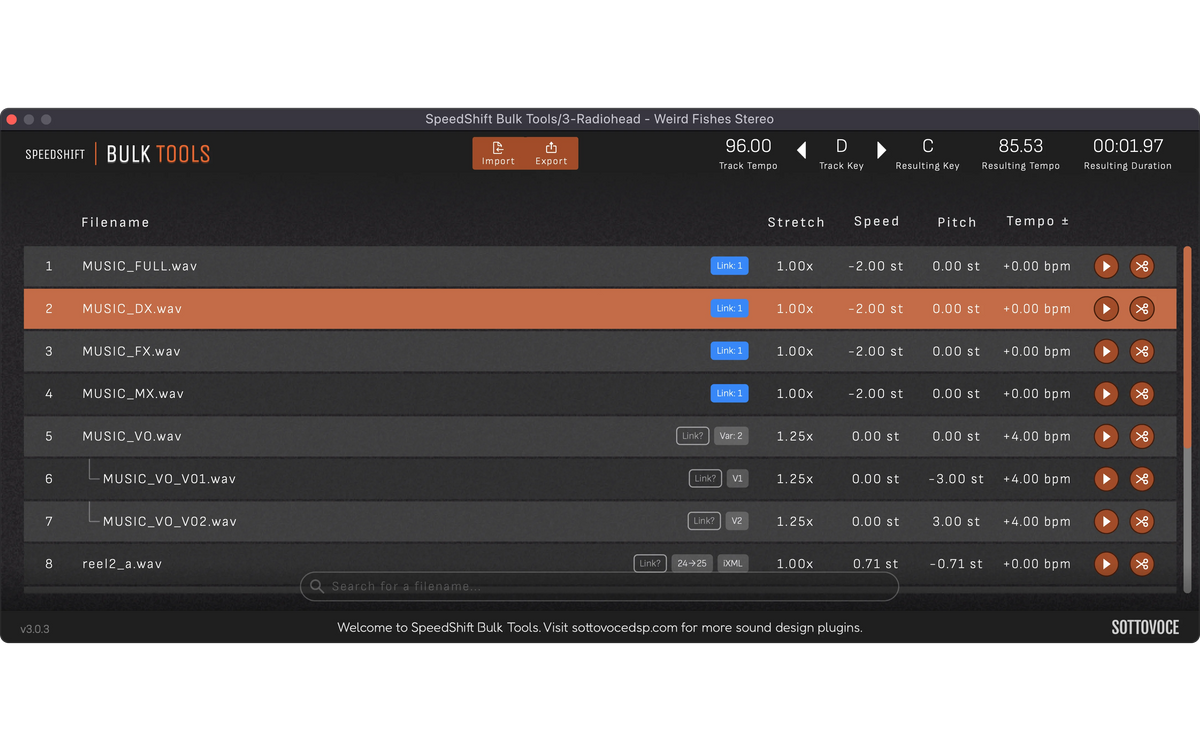
Five clips, one spreadsheet. Edit Stretch, Speed and Pitch, drag down a column to set every row at once, and press play on any row to hear it.
Features
-

Generate Pitch Variants
Turn one file into up to 128 pitched copies from scale presets, ranges or random values, each named automatically.
-

Frame Rate Conversion
Convert between film, PAL and NTSC frame rates at exact ratios, with the BWF and iXML timecode rewritten to match.
-

Filename Templating
Name a whole batch at once with tokens like category, stretch and variant, and a slash builds folders.
-

Update Metadata
BWF, iXML, UCS and Soundminer data is carried into every WAV export, with timecode and markers moved to match.
-

Trim Tool
Trim each file's start and end on its waveform, with markers and timecode following the cut on export.
-

Render In Phase (Link)
Linked stems render together through one processor, so dialogue, music and effects stay phase aligned with the full mix.


Frequently Asked Questions
Ableton Live: Create an audio track. Under audio pitch effects.
FL Studio: Add it to a Mixer insert slot, not the Channel Rack.
Logic Pro: Create a midi track. It's a virtual instrument under the menu AU Generator.
GarageBand: Create an instrument track.
Pro Tools: Create an instrument track. Under virtual instruments. It's in the pitch shift section.
Reaper: Create an empty track and add it to the FX. It makes its own audio, so the track needs no item.
Cubase: Create an audio track. It will be under Pitch Shift. IT WILL NOT WORK ON A MIDI INSTRUMENT TRACK.
Due to a bug with Ableton Live, SpeedShift Speedup does not have an AU format available in Ableton Live. Please use VST3 instead.
You need to increase the size of your buffer in your DAW, likely to 512. If you are using an old computer or do not have a SSD, your DAW will not be able to provide data to your audio card in time.
You may also like
-
 Bundle
Everything Bundle
Regular price $234.99 CADRegular price$680.00 CADSale price $234.99 CADBundle -
 Bundle
SpeedShift Bundle
Regular price $34.99 CADRegular price$79.99 CADSale price $34.99 CADBundle -
Sotto Sampler
Regular price $229.00 CADRegular price -
 Sale
SpeedShift Speedup
Regular price $24.99 CADRegular price$49.99 CADSale price $24.99 CADSale


