
ColorChord Chord Detector Manual

Overview
ColorChord Chord Detector names the chord you are playing while you play it. It shows the chord's name, where it sits in your key as a roman numeral, a description of every part of the chord, and the notes on a keyboard. Every chord you hold is kept in a history that you can look back through and export as a text file or a MIDI file.
It never changes your MIDI. Notes pass through as they are, and the plugin makes no sound of its own.
1. Usage
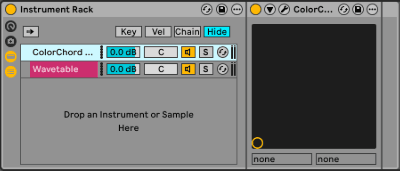
Ableton Live
Create a midi track, then use Ableton's Instrument Rack to insert it.
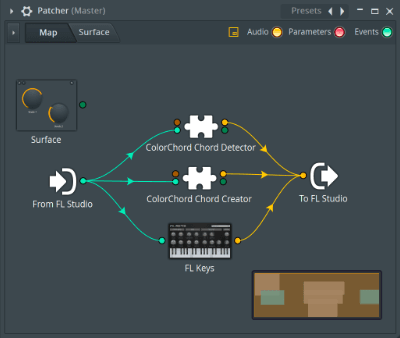
FL Studio
Create a midi track, then use FL Studio's Patcher to insert it.
Logic Pro
Create an instrument track and find it in the MIDI FX dropdown.
Pro Tools
Create an instrument track and find the plugin under MIDI Plugin.
Cubase
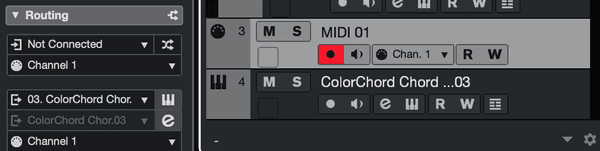
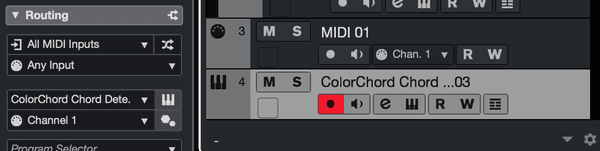
Create an instrument track. You must route the input and output midi connections yourself.
Midi Track: The midi-out goes to ColorChord
Instrument Track: The midi-in is set to "Any Input"
2. Working Key and Mode
The Working Key and the Mode at the top right set the key your chords are read in. Click the arrows on either side to step through the twelve keys, and between Major and Minor.
- The key decides how each note is spelled and which roman numeral a chord gets.
- Hover over the key or the mode to see its scale on the keyboard.
- A change of key or mode can be undone with Cmd+Z (Ctrl+Z on Windows) and redone with Cmd+Shift+Z or Cmd+Y.
- The key and the mode are saved with your DAW project.
3. Chord Display
The middle of the plugin shows the chord you are holding. When nothing is held it reads "No Chord Detected".
- Chord name: The short name of the chord, such as Am7, or C/E when a note other than the root is in the bass.
- Roman numerals: The seven chords of the working key, I to vii° in a major key and i to VII in a minor key. The chord you are holding is shown in yellow when it belongs to the key. Hover over a numeral to see that chord on the display and the keyboard.
- Description: The full name of the chord, such as "A Minor Seventh". Each part of the name is underlined in its own colour.
- Alternative interpretations: When the same notes can also be read as another chord, the info bar at the bottom lists the other names.
The info bar also explains whatever is under the mouse. Hover over any control to see what it does.
4. Keyboard and Detection Trim
The keyboard along the bottom shows every note you are holding, with its name above the key.
The trim marker on the keyboard sets the highest note that counts towards the chord. Drag it, and every note above it is left out of detection and labelled in yellow. Use it to stop a melody played above the chord from changing the chord's name. Hovering over the marker or dragging it shows the note it is set to in the info bar, and a change can be undone.
5. Chord History
Every chord you hold for half a second is added to the history. Holding the same chord does not add it again, but letting go and playing it again does.
- The History panel at the right shows the last eight chords, the newest at the bottom.
- Hover over a chord in the panel to see it again on the display and the keyboard.
- Click the x at the top of the panel to hide it until the plugin is loaded again, for example when you reopen your project. Settings > Chord History > Show History brings it back sooner.
- The history keeps the last 256 chords and is saved with your DAW project.
Everything else is in the Chord History submenu of the settings menu:
- Hide History / Show History: Hides or shows the History panel.
- View Full History: Opens the whole history, grouped by key and mode, with each chord's notes and how long it was held.
- Clear Full History: Empties the history straight away. There is no confirmation, and it cannot be undone.
- Export Full History To Txt File: Saves the history as a text file, grouped by key and mode in the order you played. The file is named with the date and time and is saved to your Desktop unless you choose another folder.
- Export Full History To Midi File: Saves the history as a MIDI file, the chords one after another, each lasting as long as you held it.
- Always Hide History From UI / Always Show History In UI: Whether the History panel shows when the plugin opens. This is remembered on your computer rather than in the project.
The info bar confirms an export with the file's name, or says that it failed.

6. Settings
Click the SOTTOVOCE logo at the bottom right to open the settings menu.

- View Licence Agreement: Shows the EULA and copyright notice.
- View Licence Information: Shows the active licence information.
- View Manual: Brings you to this page.
- Chord History: Shows, hides, views, clears and exports the history. See Chord History.
- Scale-up Plugin Dimensions / Scale-down Plugin Dimensions: Shows the plugin at 100 or 150 percent. Scale-up is greyed out when the larger window would not fit on your display.