
ColorChord Chord Creator Manual

Overview
ColorChord Chord Creator builds chords from the key you are working in. Pick one of the key's chords, then shape it with a type, an inversion, a suspension and an added tone. The plugin shows the chord's name, a colour coded description of every part of it, and its notes on a keyboard. Drag the chord into your DAW as a MIDI clip, or play along on your MIDI keyboard to check your hands against it.
It never changes your MIDI. Notes pass through as they are, and the plugin makes no sound of its own.
1. Usage
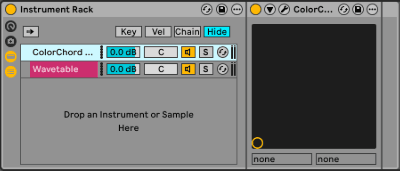
Ableton Live
Create a midi track, then use Ableton's Instrument Rack to insert it.
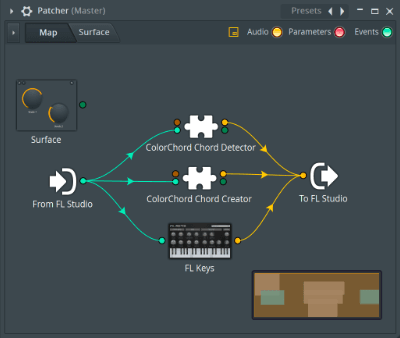
FL Studio
Create a midi track, then use FL Studio's Patcher to insert it.
Logic Pro
Create an instrument track and find it in the MIDI FX dropdown.
Pro Tools
Create an instrument track and find the plugin under MIDI Plugin.
Cubase
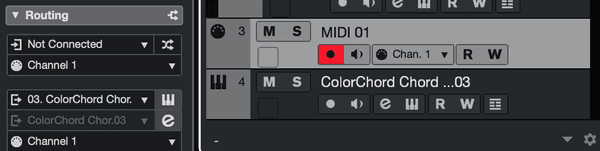
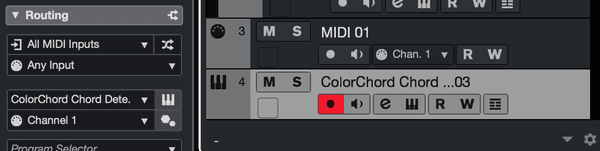
Create an instrument track. You must route the input and output midi connections yourself.
Midi Track: The midi-out goes to ColorChord
Instrument Track: The midi-in is set to "Any Input"
2. Working Key and Mode
The Working Key and the Mode at the top right set the key your chords are built in. Click the arrows on either side to step through the twelve keys, and between Major and Minor.
- The key decides which chords the Chords row offers and how each note is spelled.
- Hover over the key or the mode to see its scale on the keyboard.
- A change of key or mode can be undone with Cmd+Z (Ctrl+Z on Windows) and redone with Cmd+Shift+Z or Cmd+Y.
- The key and the mode are saved with your DAW project.
3. Building a Chord
Pick a chord from the Chords row, then shape it with the buttons around it. The selected button in each group is yellow.
- Chords: The seven chords of the working key, shown as roman numerals.
- Type: How far the chord is stacked: a plain triad (-), or a 7th, 9th, 11th or 13th chord. Extended chords follow the key, so in C major the iii chord with a 9th is Em7b9.
- Inversions: Which chord note is in the bass: the root (-), or the 1st, 2nd or 3rd inversion. A suspended chord in 1st inversion puts its suspended note in the bass, for example Csus4/F.
- Sus: Replaces the third with the second (2) or the fourth (4). Choose - for no suspension.
- Add: Adds a 9th, 11th or 13th on top of the chord. Choose - for no added tone.
A button is greyed out when choosing it would not fit the chord as it stands:
- A triad has no 3rd inversion.
- A 7th chord cannot add a 9th.
- A 9th chord cannot be inverted, suspended to the 2nd, or add a 9th or 11th.
- An 11th chord cannot be inverted, suspended to the 4th, or add a tone.
- A 13th chord cannot be inverted, suspended, or add a tone.
Hover over any button to preview the chord it would make, on the display and the keyboard, without selecting it. Every selection can be undone, and the chord you build is saved with your DAW project.
4. Chord Name and Description
- Chord name: The short name of the chord, such as Am7, or Am7/C when a note other than the root is in the bass.
- Description: The full name of the chord, such as "A Minor Seventh In The First Inversion (Over C)". Each part of the name is underlined in its own colour, and the keyboard uses the same colours for the notes that part adds.
- Alternative interpretations: The info bar at the bottom lists the other names the same notes can go by.
The info bar also explains whatever is under the mouse. Hover over any control to see what it does.
5. Keyboard and Playing Along
The keyboard along the bottom shows the chord's notes in the colours of its description, with their names above the keys. Hover over the keyboard, the key or the mode to see the working key's scale instead.
Play your MIDI keyboard to check your hands against the chord. Every key you press is coloured:
- Green: the note is in the chord.
- Grey: the note is in the key, but not in the chord.
- Red: the note is outside the key.
6. Dragging the Chord into Your DAW
Drag the MIDI chip at the top of the plugin onto a track in your DAW. It drops the chord as a one bar MIDI clip at 120 BPM, named after the chord.
7. Settings
Click the SOTTOVOCE logo at the bottom right to open the settings menu.

- View Licence Agreement: Shows the EULA and copyright notice.
- View Licence Information: Shows the active licence information.
- View Manual: Brings you to this page.
- Scale-up Plugin Dimensions / Scale-down Plugin Dimensions: Shows the plugin at 100 or 150 percent. Scale-up is greyed out when the larger window would not fit on your display.